
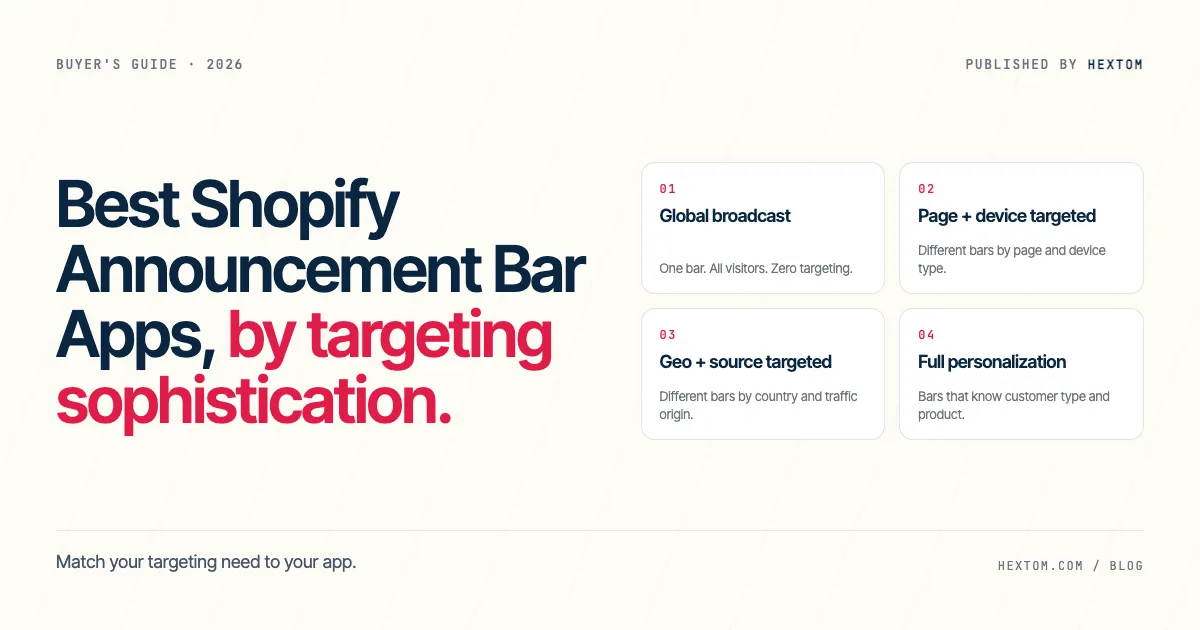
The right Shopify announcement bar app depends less on cosmetic features — colors, fonts, animations — and more on how precisely the bar needs to know who it’s talking to. A one-promotion store needs one bar shown to everyone. A store running region-specific offers, source-specific landing pages, and loyalty-segment messaging needs bars that know where the visitor came from and who they are. This guide segments the eight Shopify announcement bar apps merchants ask about most often by targeting sophistication, recommends a primary pick and an alternative for each level, and includes a comparison table and FAQ aimed at the questions merchants actually ask.
Quick answer: Match your targeting need to your app.
- No targeting needed → Essential Announcement Bar (free)
- Page + device targeting → Hextom Quick Announcement Bar (free plan)
- Geo + traffic-source targeting → Hextom Quick Announcement Bar (Premium, $9.99/mo)
- Customer + product personalization → Hextom Quick Announcement Bar (Premium) or Omnisend (for email-linked personalization)
How to choose: a four-question decision flowchart
Answer these in order. The first “yes” is your targeting level.
- Do you need different bars for visitors in different countries? → Geo + source targeted (segment 3) or Full personalization (segment 4) — continue to Q3.
- Do you need different bars on specific pages or for mobile vs. desktop? → Page + device targeted (segment 2) — Hextom Quick Announcement Bar free plan.
- Do you need bars that change based on where traffic came from (Google, Facebook, email campaigns)? → Geo + source targeted (segment 3) — Hextom Quick Announcement Bar Premium.
- Do you need bars that change based on customer type (new vs. returning, VIP) or product context? → Full personalization (segment 4) — Hextom Quick Announcement Bar Premium or Omnisend.
If you answered no to all four questions, you need segment 1 (global broadcast) — one bar shown to everyone, no targeting logic. Essential Announcement Bar handles this for free. If you answered yes at Q2 (and no to Q1), Hextom QAB's free plan handles page and device targeting at zero cost. If you answered yes at Q1 and Q2, Hextom QAB Premium covers both geo and page+device targeting simultaneously — Premium removes the single-bar limit of the free plan. If you answered yes at Q1 and Q3, Hextom QAB Premium ($9.99/mo) covers country and traffic-source targeting. If you answered yes at Q1 and Q4, Hextom QAB Premium adds customer-type and product-context targeting on top.
The four targeting levels
1. Global broadcast
What it is. One bar, the same message, shown to every visitor with no conditions — no rules about where they are, what page they’re on, or what device they’re using.
Who it suits. New stores, single-promotion windows, merchants who want zero configuration overhead. The bar is the message.
Tradeoff. Every visitor sees identical copy. You can’t react to where they came from, what they’ve bought, or whether they’re on mobile. Works fine when your only promotion is store-wide and you don’t need to segment.
Examples. Essential Announcement Bar, POWR: Sales Popup.
2. Page + device targeted
What it is. Different bars appear on different pages (home, product, collection, checkout) and on different devices (desktop, tablet, mobile). The targeting is rule-based but visitor-blind — everyone on mobile in the same country gets the same mobile bar.
Who it suits. Merchants who want a homepage-only banner, a product-page-only bar, or mobile-specific messaging without adding geo or source logic.
Tradeoff. Targeting is structural (page and device), not personal (visitor identity). Can’t distinguish a shopper from Tokyo from one in Toronto using the same device. Works well as a free-plan capability.
Examples. Hextom Quick Announcement Bar (free plan), Vitals: All-in-One Marketing.
3. Geo + source targeted
What it is. Bars respond to where the visitor is (country or region) and how they arrived (traffic source: Google, Facebook, email campaigns, direct). A Canadian visitor coming from a Facebook ad sees a different bar than a US visitor coming from Google.
Who it suits. Stores running region-specific promotions, currency-adjusted messaging, or source-specific landing-page bars. Merchants who’ve built out distinct campaigns per source and want the announcement bar to reflect that investment.
Tradeoff. Requires knowing which campaigns drive which sources and setting up bars per region/source combination. More bar management overhead than global broadcast or page+device. No knowledge of individual customer history — a returning customer from Germany looks identical to a new visitor from Germany.
Examples. Hextom Quick Announcement Bar (Premium, $9.99/mo), Privy.
4. Full personalization
What it is. Bars change based on customer type (new vs. returning, VIP tag, customer-segment membership), the product or collection the visitor is currently viewing, and all of the geo + source signals from segment 3. The bar knows who the customer is, not just where they came from.
Who it suits. Loyalty-focused stores and repeat-purchase businesses where the bar is part of a relationship, not just a broadcast. Merchants who want a VIP bar for tagged customers, or a bar that changes by product category.
Tradeoff. Highest configuration burden — requires knowing which customer tags or segments you’re targeting and what each group should see. Some use cases (bars tied to email or SMS flows) need a full marketing suite rather than a standalone bar app. The bar reads customer session data, which requires the customer to be logged in for customer-tag targeting to fire.
Examples. Hextom Quick Announcement Bar (Premium), Omnisend (for email-linked personalization).
Recommended app per targeting level
For each segment: a primary pick + one alternative, each with a one-sentence rationale.
Global broadcast
- Primary: Essential Announcement Bar. Best when you want a free, zero-configuration bar that shows one message to all visitors with no setup beyond the message text itself.
- Alternative: POWR: Sales Popup. Best when you want slightly more design flexibility (color, font, button styling) without leaving the global-broadcast model.
Page + device targeted
- Primary: Hextom Quick Announcement Bar. Best when you want page-level and device-level bar control at no cost — the free plan covers page targeting, exclude-page targeting, and device targeting, and you can configure it within 30 seconds from a template. (Disclosed: this is our app. We put it here because page+device targeting on a free plan is the genuine segment-2 differentiator, not because we wrote the article.)
- Alternative: Vitals: All-in-One Marketing. Best when you’re already running Vitals for other conversion tools and want announcement bar functionality bundled into the same app. Note: Vitals is a paid suite — the bar feature is bundled, not standalone.
Geo + source targeted
- Primary: Hextom Quick Announcement Bar (Premium). Best when you need country-level and traffic-source-level segmentation in a dedicated announcement bar at $9.99/month — not as part of a broader marketing suite that adds cost and complexity you don’t need. (Disclosed: this is our app.)
- Alternative: Privy. Best when you’re already running Privy for popups or email capture and want geo-targeted bars within the same platform. Privy’s bar capability is solid but secondary to its popup/email toolset — standalone-bar merchants overpay.
Full personalization
- Primary: Hextom Quick Announcement Bar (Premium). Best when you want customer-tag targeting, product-context targeting, geo, and source — all in a dedicated announcement bar, not a marketing suite. (Disclosed: this is our app.)
- Alternative: Omnisend. Best when your personalization need is tightly linked to your email or SMS audience segments — if the bar should change for subscribers vs non-subscribers, or should mirror a running email campaign, Omnisend’s bar capability integrates with its audience data. Choose Omnisend if you’re already in their ecosystem; it’s overkill as a standalone bar solution.
App comparison at a glance
Snapshot of the 8 apps reviewed, against the axes that matter when choosing one. Values verified April 2026 against each app's Shopify App Store listing or, where the tool integrates externally rather than via the App Store, the vendor's public pricing page.
| App | Architecture | Active bars | Scheduling | Analytics | Free plan | App Store rating |
|---|---|---|---|---|---|---|
| Essential Announcement Bar | Global broadcast | Unlimited (2,000 views/mo free) | Yes (Essential plan, $9.99/mo) | No (free) / Yes (paid) | Yes (up to 2,000 monthly views) | 5.0 · 1,195 reviews |
| POWR: Sales Popup | Global broadcast | 1 free / unlimited paid | Yes (paid) | Yes (paid) | Yes (limited impressions) | 4.7 · 410 reviews |
| Hextom Quick Announcement Bar | Full personalization | 1 free / unlimited paid | Yes (Premium) | Yes (Premium) | Yes (page + device targeting) | 4.9 · 2,305 reviews |
| Vitals: All-in-One Marketing | Page + device targeted | 1 active at a time (paid only) | Yes | Yes | No (from $29.99/mo, 7-day trial) | 4.9 · 2,621 reviews |
| Privy | Geo + source targeted | Unlimited displays | Yes | Yes | No (from $24/mo) | 4.5 · 4,102 reviews |
| Omnisend | Full personalization | Popups/forms (no dedicated bar) | Yes | Yes | Yes (250 contacts, 500 emails/mo) | 4.7 · 2,941 reviews |
| Attrac Popup, Announcement Bar | Geo + source targeted | 1 free / unlimited paid | Yes (paid) | Yes (paid) | Yes (1,500 impressions/mo) | 5.0 · 875 reviews |
| Hello Bar | Geo + source targeted | 1 free / unlimited paid | Yes (paid) | Yes (paid) | Yes (limited impressions) | N/A · external |
Sources verified April 2026:
- Essential Announcement Bar — apps.shopify.com/essential-announcement-bar
- POWR: Sales Popup — apps.shopify.com/powr-popup (POWR Sales Popup — dedicated announcement-bar handle no longer active; bar feature included in this app)
- Hextom Quick Announcement Bar — apps.shopify.com/quick-announcement-bar-always-keep-your-customers-informed
- Vitals: All-in-One Marketing — apps.shopify.com/vitals
- Privy — apps.shopify.com/privy
- Omnisend — apps.shopify.com/omnisend
- Attrac Popup, Announcement Bar — apps.shopify.com/announcement-bar-maker-by-apphero
- Hello Bar — hellobar.com (external tool, not on Shopify App Store)
Hextom Quick Announcement Bar covers all four targeting levels across its free and Premium plans — it appears in the Full personalization row because that is its ceiling capability. The Active bars, Scheduling, and Analytics cells are bolded to signal Premium-gated differentiators. Cells reading N/A · external mean the tool is not on the Shopify App Store and has no App Store metrics.
Frequently asked questions
Is Hextom Quick Announcement Bar free?
Yes — Hextom Quick Announcement Bar has a free plan that includes one active bar, call-to-action button support, page targeting (show on specific pages, exclude specific pages), device targeting (desktop, tablet, mobile), and email support. The free plan is sufficient for segment 2 (page + device targeted) use cases. Geo targeting, unlimited bars, customer targeting, product targeting, visitor-source targeting, analytics, and auto-scheduling require the Premium plan at $9.99/month.
Can I show different announcement bars to visitors in different countries?
Yes — geo targeting is a Premium plan feature in Hextom Quick Announcement Bar ($9.99/month). You configure a bar with a target list of countries, and visitors from those countries see that bar while others see a different bar (or none). Most dedicated announcement bar apps only add geo targeting on paid plans; the free global-broadcast tier shows the same bar everywhere.
How many bars can I run at once on the free plan?
On Hextom Quick Announcement Bar's free plan, you can have one active bar at a time. The Premium plan ($9.99/month) gives you unlimited active bars, which is the feature that enables multiple simultaneous bars for different pages, devices, countries, and traffic sources. Most competing free plans also cap at one active bar.
Does Quick Announcement Bar track clicks and performance?
Yes — analytics (click tracking and call-to-action performance tracking) is included in the Premium plan ($9.99/month). On the free plan, you can set up bars with call-to-action buttons but you don't get click-through reporting. If performance tracking is a must-have, plan for the Premium upgrade.
What's the difference between Quick Announcement Bar and a free shipping bar app?
A free shipping bar app (like Hextom Free Shipping Bar) is designed specifically to promote free shipping offers — typically with a cart-aware progress message ('$8 away from free shipping') that reads your customer's cart contents in real time. A quick announcement bar app is a general-purpose banner for any message: promotions, policy updates, seasonal announcements, event notices. Quick Announcement Bar doesn't read cart state; it shows the configured message. If your only bar need is a shipping-progress message, use a free shipping bar app. If you need general announcement capability, use Quick Announcement Bar.
When should I use a full marketing suite (Privy, Omnisend) instead of a dedicated announcement bar app?
Use a full marketing suite when your announcement bar needs to be tightly integrated with your email or SMS audiences — for example, when you want a bar that shows only to Omnisend subscribers, or that changes based on which email campaign a visitor clicked. A dedicated bar app like Quick Announcement Bar targets by page, device, geo, traffic source, and customer tag; it doesn't have native hooks into your email platform's audience segments. If you don't need that email-audience integration, a dedicated bar app is simpler, cheaper, and easier to configure.
Related buyer’s guides
If you’re also evaluating other Shopify app categories, our other guides may help:
- Best Shopify Free Shipping Bar Apps 2025 — segmented by behavior model (static threshold, dynamic progress bar, tiered rewards, countdown-augmented).
- Best Shopify Translation Apps 2025 — segmented by translation architecture (file-based, live proxy, native Shopify, hybrid).
- Best Shopify Image Optimizer & SEO Apps 2025 — ranked by SEO coverage, transform breadth, backup, pricing, and compression.
- Best Shopify Bulk Product Edit Apps 2026 — ranked by field coverage, targeting depth, scheduling, undo safety, and pricing.
Last updated
This guide is reviewed quarterly. Pricing and ratings are snapshots as of April 25, 2026; vendor targeting-model decisions change less often.
The Hextom engineering team — we ship 13 apps used by 270,000+ Shopify merchants since 2015. Reach us at hello@hextom.com if a fact in this guide is out of date.